Getting Started
Are you a brand new user of the Episerver Hoyavision CMS? These configuration tips will help you to get started:
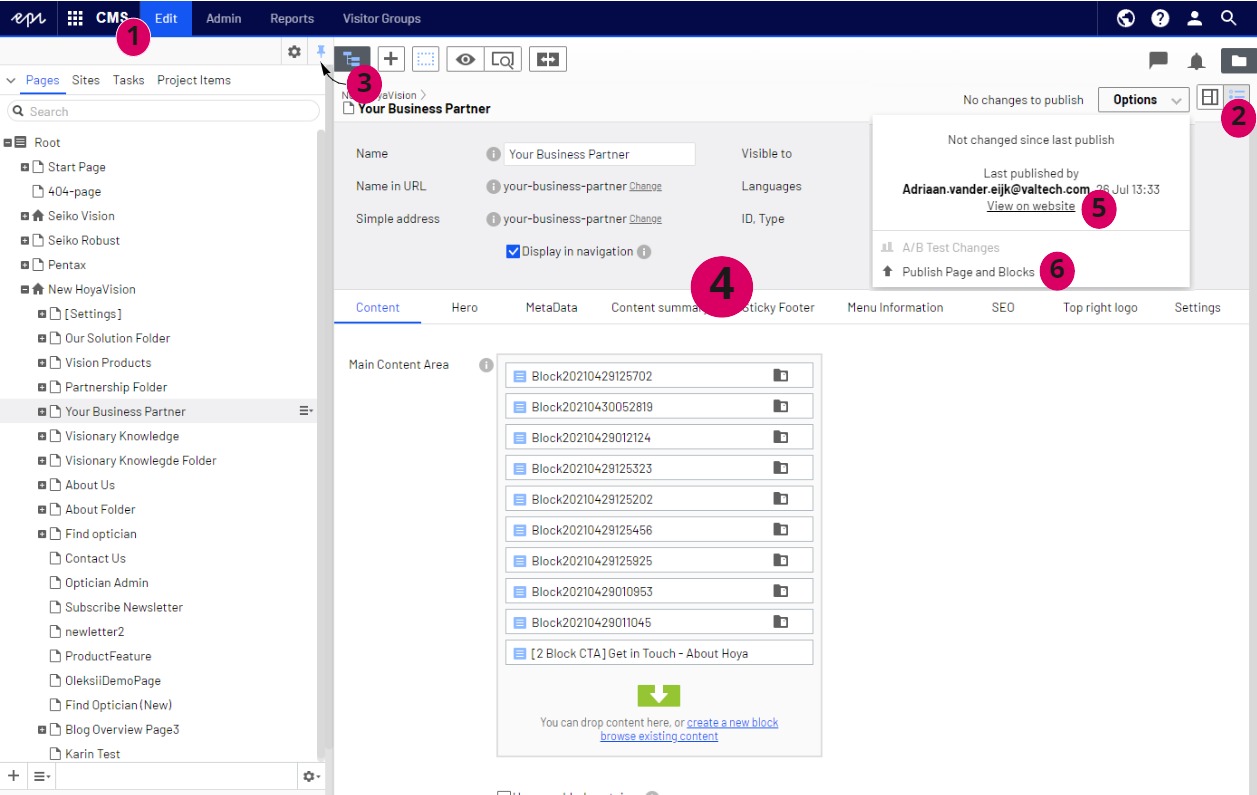
- After logging in, choose CMS → Edit
- By default you will see the "On-page editing" mode. Change this to "All properties" by clicking the icon on the top right corner to be able to see and work with your content.
- With the icon "Toggle navigation pane" on the left you will see all the pages of your website in a tree-structure. This structure is identical to how page urls are displayed on the live site (e.g. a subpage in this tree structure will also reflect in the page url: /about-us/careers). Pin the tree structure to your screen by using the little thumbtack icon.
- On the right side you will see the properties and the content of the page. The grey area shows the general properties of this page. In the tabs underneath, the page content and more properties can be edited.
- Preview your page by clicking open the "Options" button on the top right and choose "View on website".
- Publish your changes by clicking the "Options" button on the top right. Your changes will become instantly visible on your live website.