Block naming
The proper way to name a new block is Block type in brackets and a descriptive title behind it. For example:
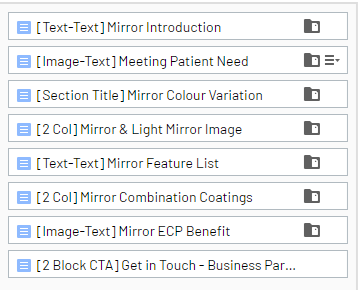
Blocks in Episerver - Frequently used
Click the link to view the blocks on the demo site.
Page structure
- Two Column Content Block
- Three Column Content Block
- Four Column Content Block
Headers
- Divider Block - Simple block with only header & Subheader
- Section Title Block
Content
- Image-Text : 2 Column Side by Side
- Image-Text: Background Image Text on Top
- Text-Text: 2 Column Side by Side
- Video block
Links
- Content List Block - This block contains links to Content Pages of different types for which an image and summary will be shown as well as a link to the detail page
- CTA : Two Buttons
- CTA-block - Block with CTA button
Product detail pages
- Product Feature Block - Informs visitors of the unique characteristics of products
- Product Feature List Block - Displays the Product Feature Block as a list
Blog detail pages
- Blog: Image block
- Blog: Text block
Blocks in Episerver - rarely/not used?
- Author block
- Compare two images block - Compares two images with slider
- Display Products Block
- Display Single Product Block
- Footnote block - Small centered text
- Icon Grid Block - A block with icons and text in three columns
- Image Block
- Inpage menu page holder - Holds reference to root node for pages to be rendered in page
- Lens campaign CTA-block - Block with CTA button
- Lens campaign title block - Short left aligned title block
- Multi Column Content Block - Select from one to three columns
- Multiline Footnote Block - Small centered text
- Newsletter Form Block
- Product Download Block - Allows visitors to download product information
- Quotation Block
- Regional Contact Block
Forms
- Form container